Crossword Daily: Word Puzzle
- 4.1
- Rating
- 100.00K
- Installs
- Free
- Price
 Analysis by App-foxy
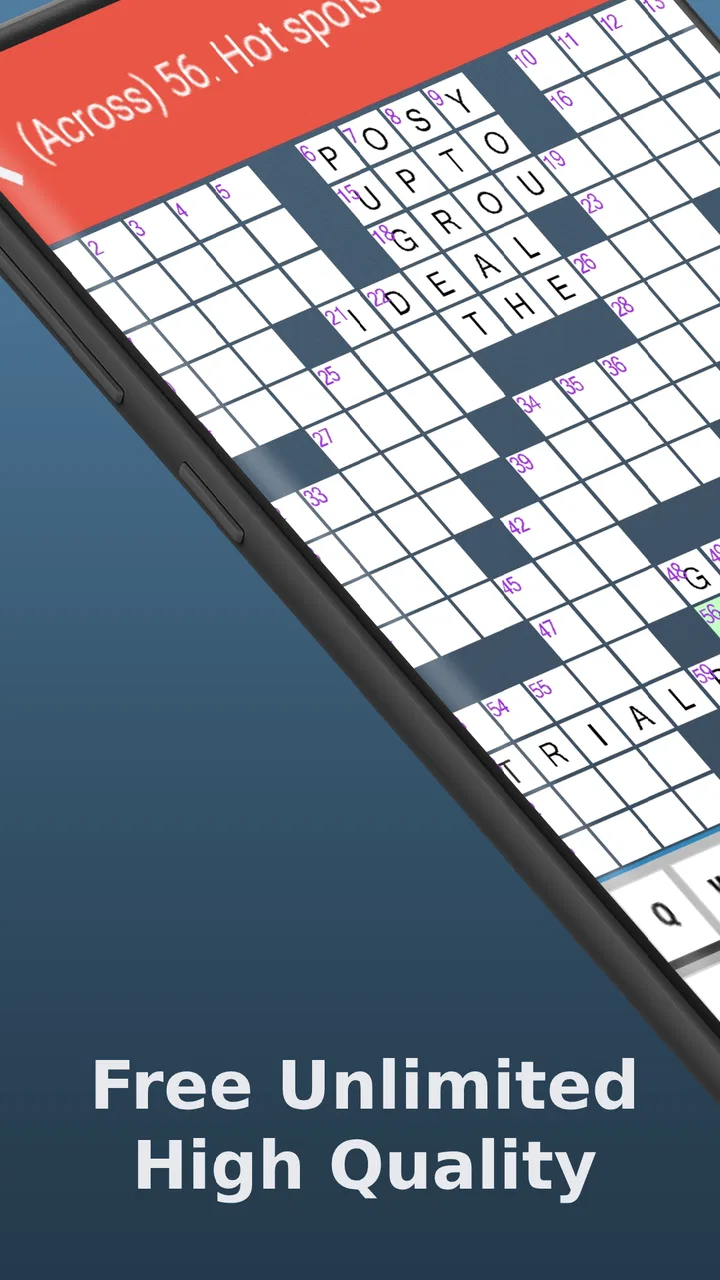
I opened Crossword Daily: Word Puzzle expecting a simple way to fill a few spare minutes, and that is exactly where it makes sense. This is a word game from PocketStar that gathers crossword puzzles in one place, giving me a familiar grid, a clue, and the small satisfaction of turning uncertainty into a completed answer. It is free to start, rated for Everyone, and its appeal comes less from spectacle than from a dependable daily routine.
The first thing I noticed is how quickly the game gets me into the puzzle. There is no complicated setup to learn before I can begin thinking. I choose a crossword, read a clue, enter a possible answer, and immediately receive the most important kind of feedback: the grid either starts making sense or exposes a mistake. That direct exchange between action and result is the heart of the experience.
How the crossword loop feels in everyday use
I find the everyday rhythm here is less about finishing quickly and more about choosing a useful next move: I start with clues I can answer, then let their crossing letters make the uncertain ones easier to judge. If I’m playing in a short break, I stop when progress slows rather than forcing a guess; that keeps the puzzle pleasant to return to. The next section looks at the small habits that help when the grid stops opening up.
You May Also Like

 Blood Strike: 2.5 Anniversary
Blood Strike’s Loadouts Turn Every Drop Into a Tactical Gamble
A close look at Blood Strike’s custom loadouts: how fast access to signature weapons reshapes its battle royale rhythm, rewards preparation, and narrows the gap between fights.

 Pandora - Music & Podcasts
Pandora’s Music Is Easy to Start, but Harder to Recover
Pandora’s strength is its low-effort path from a seed to a station. Its weak spot is how much confidence it asks you to place in connection, setup, and quiet recovery.

 8 Ball Pool
 Is Built on Rivalries, Rematches, and Routine
A close look at the rivalries, rematches, shared routines, and unanswered safety questions that turn a quick pool match into a persistent mobile community.

 Samsung Music
’s Quiet Strength Is Playing What You Already Own
Its reach comes less from spectacle than from dependable access to a personal library. That simplicity is both the app’s strongest retention engine and its ceiling.

 AccuWeather: Weather Radar
AccuWeather Review: A Quick, Clear Forecast for Everyday Decisions
For everyday plans, the best forecast is the one you can understand quickly. AccuWeather makes rain timing, radar, and local conditions easy to act on, with a few trade-offs.

 Hill Climb Racing
Why Hill Climb Racing Still Turns Crashes Into One More Run
A tiny car, a bumpy hill and one more upgrade: Hill Climb Racing keeps resurfacing because its simple chaos makes every near-miss feel personal.
More From Our News Desk



The first action is deliberately familiar
Crossword Daily works because it does not ask me to understand an unusual game system. I approach it as I would a printed crossword: scan the clues, look for an easy entry, and use crossing letters to unlock harder answers. That makes the opening seconds comfortable for experienced crossword players, while newcomers can learn through the puzzle itself rather than through a long tutorial.
I usually begin with clues that have an obvious answer instead of trying to solve the grid from top to bottom. This is more than a preference. A few confirmed letters create useful anchors, and those anchors change vague clues into manageable ones. If I get stuck early, moving to another part of the grid is more productive than repeatedly forcing the same answer.
The collection is presented as a selection of crossword puzzles from different papers, so the experience has some variety rather than feeling like one endlessly repeated board. That variety matters when I want a fresh challenge but do not want to learn a completely different type of word game. The basic rules remain stable while the wording, vocabulary, and difficulty can change from puzzle to puzzle.
One practical habit makes a noticeable difference: I treat an uncertain answer as a working theory, not a commitment. A clue may appear to fit until a crossing letter disagrees. Checking the surrounding entries before becoming attached to one guess prevents a small error from spreading through the grid. This is where the app feels most like a traditional crossword and least like a fast guessing game.
Feedback arrives through the changing grid
The feedback rhythm is simple but effective. I enter an answer, inspect the letters around it, and decide whether the next move should build on that answer or send me elsewhere. Every solved entry gives me more information, while every stubborn blank reminds me that the puzzle still has another layer to reveal.
That rhythm keeps the game active without making it frantic. I am not chasing a timer or reacting to constant visual effects. Instead, the reward is informational: one answer narrows the possibilities for several others. When a crossing word suddenly becomes obvious because of a single new letter, the payoff feels earned.
This also explains why the game can suit different moods. I can play attentively at a desk, or work through a clue while waiting for an appointment. A crossword does not demand that every second be filled with tapping. It gives me a problem to return to, and the pause between attempts can sometimes help me see a clue differently.
There is a trade-off here. Players who want rapid rounds, dramatic progression, or constant rewards may find the pace restrained. The game’s feedback is quiet and puzzle-based. It will not replace a word scramble, an arcade title, or a competitive trivia app for someone who needs immediate excitement.
Why solving one clue makes another session tempting
The main reward is completion, but the smaller rewards along the way are just as important. A difficult clue finally fitting into the grid produces a clear sense of progress. Then the newly revealed letters invite another attempt. I often start by planning to solve only a few entries and continue because the puzzle has moved from “unclear” to “almost there.”
This is a good example of a restrained game loop: act, receive useful feedback, gain a little progress, pause or continue, and eventually reset with another puzzle. The reward is not an inventory item or a character upgrade. It is the feeling that my own reasoning has improved the board.
For me, the best use case is a short daily mental break. I might open it after breakfast, solve the easiest clues, leave the harder corners alone, and return later with a different approach. That stop-and-start pattern feels natural for crosswords. It also means the game can occupy a longer session when I am in the mood without requiring one uninterrupted block of time.
Another useful scenario is sharing the thinking with someone nearby. Crossword clues can become a small conversation: one person suggests a synonym, another notices a crossing letter, and the answer becomes clear. This is not a dedicated multiplayer experience, but the format naturally supports casual cooperation without turning the puzzle into a social competition.
The reset is what keeps the routine fresh
Once a crossword is complete, the satisfaction comes from closing a small mental task. The reset then matters: I need another puzzle that feels familiar enough to enter quickly but different enough to justify starting again. The paper-based variety behind the collection helps support that routine, because I am not simply replaying one fixed arrangement.
I like that this reset is clean rather than exhausting. A completed puzzle does not require me to maintain a complicated build or remember a long chain of objectives. I can finish, put the phone away, and return another day. When I come back, the basic action is immediately understandable: select a puzzle, find an entry, and let the crossings guide the next move.
That simplicity can also expose the game’s limits. If I want a strong sense of long-term progression, a large achievement system, or a campaign with escalating story beats, this is probably not the right choice. Its reason to return is the availability of another crossword and the pleasure of solving it, not a deep meta-game wrapped around the puzzles.
Practical details before you install
The game is free, which makes it easy to try without an upfront purchase. Optional in-app purchases are listed from $9.99 to $39.99 per item, so I would check the purchase flow carefully before confirming anything, especially if a child is using the device. The Everyone rating makes the game broadly suitable in content terms, but that does not remove the need for sensible purchase controls.
It has been available since Oct 27, 2014, and the current version is 1.11.34. The minimum operating system is Android 5.0. Those details make it a plausible option for someone using an older compatible Android phone, although I would still keep the system software and app installation current where possible.
The game has built a visible audience, with more than 100 thousand installs, around 4.3 thousand ratings, and an average rating of 4.1. I read that as a sign of steady interest rather than proof that every crossword will suit every player. Crossword vocabulary is personal: a puzzle that feels fair to one person can feel obscure to another, particularly when a clue depends on a specific expression or a less familiar word.
That is one reason I would not judge the experience after a single difficult board. A crossword can be a poor match because of its wording, not because the whole game is poorly designed. Trying several puzzles gives a better sense of whether the variety and clue style fit my vocabulary and patience.
Where it stands beside other word games
Compared with a daily word guessing game, Crossword Daily asks for broader reasoning. I am not looking for one hidden word through repeated attempts; I am solving a network in which each answer affects another. That makes the experience more satisfying when I enjoy deduction, but less convenient when I want a quick result with a clearly defined number of guesses.
Compared with a paper crossword, the phone format is easier to carry and simpler to revisit. I do not need a pencil, an eraser, or a flat surface. The drawback is that a screen does not provide the same tactile feeling as writing on paper, and some readers may prefer the calm ritual of a newspaper. For them, this app is best seen as a portable companion rather than a complete replacement.
Compared with a crossword subscription service or a large premium puzzle archive, the free entry point is attractive. However, players who specifically want editorial controls, extensive difficulty filters, or a highly structured archive may prefer a more specialized alternative. I would choose this app for accessible variety and casual daily solving, not for managing a serious crossword collection.
It also differs from word games built around speed. Here, slowing down is often the smarter move. I can reread a clue, inspect crossing letters, and wait for a connection. That makes it a strong fit for someone who finds rapid-fire games tiring, but a weak fit for someone who measures enjoyment by quick rounds and constant movement.
Small strategies that improve the experience
My first recommendation is to build the grid from certainty outward. Start with clues whose answers are clear, then use their letters to approach the ambiguous entries. This avoids spending too much time on a clue that may only become understandable after its crossings are in place.
Second, I keep an eye on grammatical signals. A clue’s wording can suggest whether the answer is a person, object, action, plural, or shortened form. Combining that signal with the available spaces is often more reliable than guessing from the topic alone. When an answer seems nearly right but the grammar feels wrong, I treat that discomfort as useful evidence.
Third, I use a deliberate reset when I become stuck. Instead of staring at one corner, I move to another section, solve anything accessible, and return after the grid has changed. This turns frustration into a workflow. The puzzle has not changed, but my information has, and that is often enough to reveal the missing connection.
A fourth tip is to separate “I do not know this” from “the clue is not ready yet.” Sometimes I lack the vocabulary; sometimes I simply need more crossing letters. Recognizing the difference helps me decide whether to keep reasoning, move on, or accept that a particular puzzle is outside my comfort zone. That honesty keeps the game relaxing rather than turning every blank into a test of endurance.
Who should make room for it?
I would recommend Crossword Daily to anyone who likes traditional crosswords and wants a portable way to solve several varieties. It is especially suitable for short breaks, quiet evenings, and players who enjoy progress that comes from connecting clues rather than collecting power-ups. The Everyone rating also makes it approachable for households, provided adults supervise optional purchases when necessary.
I would be more cautious about recommending it to someone who needs accessibility options tailored to a particular visual, motor, or cognitive requirement, because the usefulness of any crossword interface depends heavily on how comfortably that person can read and enter letters. I would also steer away players who dislike uncertain clues, wordplay, or the possibility of leaving a puzzle unfinished for a while.
People looking for a competitive leaderboard, a narrative campaign, or a large progression system should choose another type of game. Crossword Daily is not trying to turn vocabulary into an action spectacle. Its strength is narrower and clearer: it gives me a grid, lets me reason through it, rewards each correct connection, and offers another puzzle when I am ready to begin again.
My verdict on the complete loop
After spending time with it, I see the appeal in the full cycle. The first action is easy: open a crossword and enter a clue answer. The feedback is immediate but thoughtful: every letter changes what I can infer next. The reward is the gradual transformation of a confusing grid into a finished one. The reset is clean, because another puzzle offers a new set of clues without forcing me through a complicated progression system.
The best reason to return is the puzzle itself, not a layer of distractions around it. That makes the experience focused, though it also means the app will feel modest to players who expect extensive extras. In my experience, it works best when I accept its slower rhythm and use the crossing letters as guidance instead of treating every clue as an isolated question.
PocketStar’s game is therefore an easy recommendation for casual crossword fans, older-device users who meet the Android requirement, and anyone wanting a free word puzzle for a daily mental pause. I would skip it if I wanted fast competition, elaborate rewards, or a carefully curated specialist archive. For everyone else, the combination of familiar rules, varied puzzles, and a satisfying solve-reset cycle makes it worth trying.
My final advice is to give it more than one sitting. Solve the obvious entries, let the grid teach you what it can, walk away when a corner becomes stubborn, and return with fresh eyes. That workflow captures what this game does best: it turns a few letters into a reason to think, a solved clue into a reason to continue, and a completed crossword into a quiet invitation to start another.
FAQs for Crossword Daily: Word Puzzle
01What is Crossword Daily: Word Puzzle and how does it work?
Crossword Daily: Word Puzzle is an engaging app that offers daily crossword challenges to enhance your vocabulary and problem-solving skills. Each puzzle is designed to test your knowledge across various themes. Players fill in the blanks with the correct words based on provided clues, making it an educational and entertaining experience.
02Is Crossword Daily: Word Puzzle available for both Android and iOS devices?
Yes, Crossword Daily: Word Puzzle is available for download on both Android and iOS platforms. Users can easily find it on the Google Play Store for Android devices and the Apple App Store for iOS devices, ensuring a seamless experience across different operating systems.
03Are there any in-app purchases or ads in Crossword Daily: Word Puzzle?
Crossword Daily: Word Puzzle is free to download, but it does include optional in-app purchases that allow players to buy hints or remove ads. Ads may appear periodically, but purchasing the ad-free version can enhance your playing experience by removing interruptions.
04Does Crossword Daily: Word Puzzle require an internet connection to play?
While Crossword Daily: Word Puzzle offers downloadable puzzles that can be played offline, some features, like accessing new daily puzzles and cloud syncing your progress, do require an internet connection. Offline play is ideal for on-the-go entertainment without data usage.
05Is Crossword Daily: Word Puzzle suitable for all age groups?
Crossword Daily: Word Puzzle is designed for a wide range of age groups, making it family-friendly. The varying difficulty levels cater to both beginners and experienced crossword enthusiasts. It's a great way for individuals of all ages to improve their language skills and enjoy a mental workout.
Pros
- Engaging puzzles for all skill levels.
- Daily challenges keep content fresh.
- User-friendly interface and navigation.
- Hints available for tricky words.
- Offline mode for play without internet.
Cons
- Ads can be intrusive at times.
- Limited free hints available.
- No option for custom puzzles.
- Occasional app crashes reported.
- Some puzzles repeat over time.

Crossword Daily: Word Puzzle
Gallery